Quik Tip | Online Payment Setting

Some sites disable tenant access to Online Payments after being late X number of days. For various reasons the sites limit the delinquent tenant to paying in person. Usually after the pre-lien or lien sale notice has been printed.
You now have the option of disabling the tenant’s ability to make an online payment based on the number of days the tenant is delinquent.

Go to Internet Settings and click on the E-commerce tab.

Example:
A tenant has a Paid to Date of 12/21/2013 and your variable is set to disable Payment Access 45 days after Paid to Date, the Make a Payment option  on the website will be disabled on 2/6/2014.
The delinquent tenant will receive the message below when they attempt to make an Online Payment.
*Please note If you don’t want to block any tenants access to online payment, regardless of delinquency status, please enter a high number like 999.
For more articles visit our Knowledgebase 

Employee Spotlight Patrik Bangle | Director of Purchasing & Production

55bfe672-673d-48f9-a88e-6c13a15a649bPatrik Bangle joined the QuikStor team back in April of 2014 when he was brought on as Director of Purchasing & Production. He brought along with him 10 years of experience in shipping, mechanical assembly and purchasing; knowledge he acquired while growing up on the Central Coast of California.
“My goal is to provide our customers with fast fulfillment of orders and repairs”, said Patrik when asked what he hopes to bring to the QuikStor team.
When not at work, Patrik enjoys spending majority of his time outdoors with his girlfriend, hiking, camping and travelling. In September, he also volunteered as a crew member at the Avon Walk to end Breast Cancer in Santa Barbara.

NCSSA Convention & Tradeshow – Come meet our Business Development Consultant Randy Fountain in North Carolina!

8cff4122-3d74-41f9-bf42-33417030becfRandy Fountain has been a leader in the self-storage industry for over 15 years. Beginning his career at QuikStor in 1999 he oversaw the development and rollout of its highly successful QuikStor Express management software.
Randy then took some time out to help manage a growing portfolio of facilities in the highly competitive Los Angeles market to gain, “boots on the ground” knowledge of the industry – Specializing in revenue growth, operational improvement, training and implementing the new technologies available from QuikStor.
He rejoined the QuikStor team in May of this year as a Business Development Consultant and hopes to share the knowledge he gained as a Self Storage Operations Manager to compliment the QuikStor product line.  As a former self-storage Operations Manager he has a unique perspective that relates well when working with other operators.  So come meet Randy in Charlotte to see how he can help grow your business! Click here for more information on the upcoming show!
November 15th – 17th at the Omni Hotel
Charlotte, North Carolina
ncssa (1)

Frighteningly Good Marketing: ‘Tricks’ and ‘Treats’ for Self-Storage Operators

By Amy Campbell, featured ISS (Inside Self Storage)

Halloween-Hero-1-AIt may seem totally unbelievable, but the holidays are coming. It all begins in just a little over 4 weeks with Halloween. While some might not see trick-or-treat time as an official “holiday,” many self-storage operators take advantage of the spook-filled fun day to market their facility.

Take US Self Storage 1 in Boynton Beach, Fla., for example. Known for its many community events, the storage operator is once again hosting a Halloween-themed party on Oct. 31 complete with food and “sweets.”

AA U-Stor-M Self Storage in Upland, Calif., is also throwing a party on Halloween day, the facility’s “8th Annual Halloween Treasure Hunt.” The operator hands out “loot” bags and a treasure map so kids and their parents can hunt for candy and other treasures. Plus, the facility features a singing pumpkin light show every night during the week of Halloween.

Last year, All Canadian Self-Storage turned its facility in Toronto into a “haunted storage” on Halloween night, daring community members to walk its ghostly halls. The operator rounded out the event by hosting a silent auction and drawings for prizes. All proceeds from the Halloween festivities benefited a local charity.

If you’re not a fan of the fright, that’s OK. Halloween is just one holiday storage operators can use as a backdrop to promote their facility. With the festive season just weeks away, now’s the time to start planning your holiday décor, parties and marketing messages to attract new customers and say thanks to existing ones.

So how can you capitalize on the season to sell your brand? This article from the Small Business Administration includes 33 ideas for holiday marketing. Check out No. 16: “Hold a kids’ contest like a make-your-own-ornament or holiday coloring. Give a big prize or just give everyone small prizes, like candy canes.”

If you’re considering an event, such as a barbecue, visit from Santa or a “family fun day,” start planning now. Here’s an excellent article from the ISS archives on how to throw a memorable community event.

Candy-CornSimply adding some fun decorations that celebrate a holiday is also a great way to attract notice. Add some creep to your facility office with a few cobwebs, spiders and a bowl of candy corns this month, then go for fall foliage and pilgrim décor in November. During December, consider adding bright lights, an inflatable snowman near your front door and a stocking packed with yummy treats. Your presentation doesn’t have to be over the top to be effective. For more ideas on holiday decorating or share your advice, check out this Self-Storage Talk thread.

Another great way to promote your facility and provide goodwill is by becoming a drop-off site for any number of charities collecting food, clothes or toys. This is a favorite act among many self-storage operators. If you’re not sure how to get involved, try your local chamber of commerce, food bank or other local charity. Nonprofits are always seeking support and will typically have a number of ideas on ways you can help.

Adding a few decorations to your facility or hosting a holiday-themed event are just another way for you to show your community you’re more than just the another storage facility. It’s an opportunity to be a part of your community, give back, attract new customers and show your gratitude to existing ones. Try these “tricks” and I’m positive you’ll receive many “treats!”

Using Self Storage for DJ Equipment

By Patrick Galvan, featured on Storage.com

Dj mixes the trackWith wedding season coming to a close, DJs will soon find themselves needing to store audio equipment and any lights or fog machines they use during their gigs. While speakers, lighting, and other equipment are capable of withstanding short-term exposure to outdoor elements like heat and humidity, keeping them in a garage or an uncontrolled environment over a long period of time isn’t a good idea.

In order to stay in good condition between gigs, DJ equipment needs to be kept in a safe space where temperature and humidity can be monitored—and where it won’t come into physical contact with other items that could damage it. Under these requirements, a self storage unit can be the perfect place for storing DJ equipment.

But before you move equipment into self storage, you need to make sure the unit you rent has adequate space and climate control. Also, your equipment should get a good cleaning before heading to storage.

Find Adequate Space for Your Equipment at a Storage Facility

Because DJ equipment is so fragile (both internally and externally), you’ll want to find a self storage unit that can hold everything without getting too cluttered. This is important because you don’t want your equipment resting against or falling on top of other equipment in your unit. But how much space do you actually need?

According to Taylor Morken, marketing director for UniqueSquared, which has grown into a top 10 pro audio retailer in the U.S. since 2007 and provides customers with a unique buying experience that minimizes the stresses of online shopping, the amount of equipment you store will ultimately determine what unit size you’ll need.

“If you’re a DJ, you probably have your performance gear (turntables and mixer or DJ controller), a PA system, lights, fog machine, etc.,” says Morken. Though not every DJ will be storing all of this equipment, these are the most common pieces stored.

Tim Kallas, general manager for Stadium Self Storage in Milwaukee, Wis., states that DJs using units to store equipment can get away with a unit in the 5×5 to 5×10 range, as long as they’re not stacking equipment.

downloadThe Importance of Controlling Humidity in Your Unit

The most significant advantage for using self storage for DJ equipment is climate control. This technology allows the temperature and humidity levels inside the unit to be controlled and adjusted. As a result, sensitive items, like electronic equipment, are protected from damage.

“The enemy of any piece of professional audio gear is humidity,” Morken says.

Too much humidity for too long presents the same threats as direct exposure to water. Over time, iron surfaces face the development of rust, and chassis could begin to corrode. Worse, humidity could make its way through gaps in the surface material and damage the internal components, ultimately ruining everything.

“The normal rate of humidity for any sustained period of time should be between 30-50%,” says Kallas, who adds you should never assume humidity isn’t an issue just because you live in a region that doesn’t experience high humidity. “In the Southwest, [there’s] very low humidity in the 15-20% range. [In this situation], you have to inject humidity into the air.” Why would you need to add humidity? Well, too low of a concentration results in static buildup, which has the potential to ruin circuitry as well.

While humidity is the big issue, Morken says temperature fluctuations aren’t that much of a concern, as long as the equipment remains stored in a “dry, cool environment.” Still, it’s always good to be on the safe side and keep your unit around 60-75°F (or room temperature).

“[Some] storage facilities will have a much narrower range of temperatures [and] move a lot of air to maintain the humidity levels,” says Kallas. “Others will have a quite broad temperature range of 50-80 degrees. So it really is buyer beware.”

670px-Buy-Your-First-Set-of-DJ-Equipment-Step-3Bullet1Clean Your Equipment Before Putting It in Storage

Once you’ve found a suitable storage unit for your DJ equipment, it’s a good idea to clean all of your equipment to remove dust and other contaminants, which, over time, can get into the internal components of your equipment and cause damage. Since equipment varies by model and manufacturer, always read the owner’s manual for recommended cleaning instructions.

In general, you can dampen a nonabrasive cloth with some isopropyl alcohol and wipe down the surfaces—for safety reasons, make sure you’re using the brands of isopropyl alcohol specifically used for cleaning electronics (like laptops screens). This will remove dust and other contaminants from the surface of your equipment.

One final tip: Cover your audio equipment with a sheet of plastic while it’s in storage. If the unit experiences roof failure or contains a high amount of dust, the sheet will help block potential damages to your equipment.

QuikStor Employee Spotlight – Randy Fountain | Business Development Consultant

Randy Fountain has been a leader in the self-storage industry for over 15 years. Beginning his career at QuikStor in 1999 he oversaw the development and rollout of its highly successful QuikStor Express management software.
Randy then took some time out to help manage a growing portfolio of facilities in the highly competitive Los Angeles market to gain, “boots on the ground” knowledge of the industry – Specializing in revenue growth, operational improvement, training and implementing the new technologies available from QuikStor.
He rejoined the QuikStor team in May of this year as a Business Development Consultant and hopes to share the knowledge he gained as a Self Storage Operations Manager to compliment the QuikStor product line.  As a former self-storage Operations Manager he has a unique perspective that relates well when working with other operators.
On his free time Randy likes to fly Drones and spend time with his two Grandchildren to keep him busy!  He is also a student of History and Comparative Religion and likes to stay informed of the latest technologies!

Quik Tip | Adding Manager Notes

Manager notes are a quick and effective way to communicate information both to management and relief personnel. When a new manager note is added, the information is displayed on both the
Report on Notes (E-W) as well as displayed on the daily report.
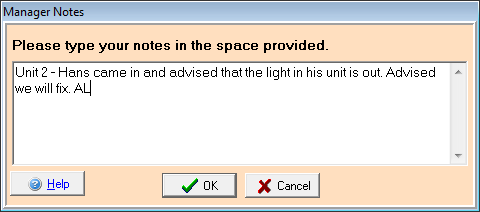
To create a manager note, go to the Favorites tab and select Manager Notes.

A blank window will appear. You can use this space to enter your note. If your note is specific to a particular tenant or unit, be sure and add that information to the note. *notes are not automatically associated with a unit #.
 
Once you have entered your note, click the OK button to save.
It will automatically be added to the next day’s daily report. You can also view all the notes for a date range by pulling a Report on Notes (E-W) as shown below.

New at QuikStor | QuikStor Custom Websites

website (2)Do you have a website for your storage facility? How will new tenants find you? Whether you currently have a website that you’re unhappy with or you don’t have one at all, QuikStor is here to help! With our simple and responsive custom websites, new tenants can easily find you online and also navigate your website with ease! Take a look at our custom website demo to see why a QuikStor custom website it right for you!

QuikStor Employee Spotlight – Dave Dentice | Installation Manager

Dave_QSDave worked for QuikStor for 5 years back in 2002 and recently reunited with the team as Installation Manager this past December.  As the Installation manager he is focusing on improving and expanding the department with his knowledge and expertise in the field.  With his knowledge of video surveillance, access control and burglar alarms, he’s not only a great addition to the QuikStor team but also a boost of confidence to our new and existing customers, knowing that they can count on us to provide the best possible installation of our products.

Dave moved to Los Angeles in 1994 from Buffalo, NY after having enough of the cold winters back east.  Since moving to LA, he met his wife of 18 years and they now share two children together – a 10 year old son and 6 year old daughter.  On his free time he enjoys playing guitar and spending time with his family.  Welcome back to the QuikStor team Dave!

Radio Self Storage | QuikStor Interview

Join Mr. Randy Fountain as he discusses 

“What you should be asking your software vendor.”

radio

Join QuikStor tomorrow, July 7th for the Radio Self Storage Interview with our Business Development Consultant, Randy Fountain!  He will be discussing what you should be asking your software vendor to make sure you’re getting the most out of your management software!

quikstorsoftwareRandy Fountain has been a leader in the self-storage industry for over 15 years. Starting his career at QuikStor in 1999 he took a hiatus to manage a growing portfolio of facilities in the highly competitive Los Angeles market. As QuikStor continued to expand their operations Mr. Fountain rejoined the team as a Business Development Consultant where he is sharing his extensive experience in software, security, and storage operations with both seasoned operators and those new to storage.

Don’t miss out on the interview!  You can also contact Randy Fountain today via email rfountain@quikstor.com OR give him a call to see how he can help you grow your business!

Call Today! 2

See information below for scheduled broadcast times!

  • Broadcast Hour Title
    • Your Management Software Checklist
  • Broadcast Date & Scheduled times (all times are EST)
    • Tuesday July 7th

3:00am | 7:00am | 11:00am | 3:00pm | 7:00pm | 11:00pm

Maintaining Your Self-Storage Security Equipment: Cameras, Access Control and More

by Dave Dentice featured on ISS (Inside Self-Storage)

The maintenance of your security system is vital to protecting your self-storage business as well as tenants’ belongings. Failing to maintain equipment could cause you to lose revenue and customer confidence.

A security technician I know recently serviced a storage facility that reported problems with its gate access. He discovered a whole lot more than just access issues. The keypads appeared to be vandalized, and numerous cameras weren’t working. The housings of the cameras that were functioning were covered in dirt or spiderwebs. The camera images were faded or plagued with ground-loop issues, which means there was no quality review for any recorded incidents.

The tech made notes and advised the manager on how he could improve site security, sketching out a plan for a maintenance overhaul, as the site was clearly neglected. He then completed the repairs, making immense improvements.

A simple, regular review of the site’s security components would’ve saved time, money and, most of all, confidence in this storage property. Don’t let this happen to you. Failure to make security maintenance a priority leads to bigger problems. Not only do you leave your facility vulnerable to break-ins, it tells customers you’re not serious about your business. Here’s how to get your security maintenance on track.

Create a Maintenance Plan

A technician checks a wireless-sensor signal to see if it's working properly and has adequate signal strength.

A technician checks a wireless-sensor signal to see if it’s working properly and has adequate signal strength.

There are simple things self-storage operators can do to maintain their facility’s security presence. The first is to assess your system’s overall condition and note any necessary repairs. Once you have your list, contact a local security company to get started on anything that needs to be fixed.

Whether your site needs work or you’re doing great with security, you can always benefit from regular maintenance. Draft a plan that suits your business, based on all the components of your system. It should address daily, weekly, monthly, quarterly and annual tasks.

First, write a maintenance schedule that includes dates for inspections. It can be helpful to keep a calendar log so you can refer to it later. You may even want to assign maintenance-related duties to a specific manager to ensure proper follow-through.

Daily checks can be a quick and easy way to keep security risks at a minimum. Add any necessary repairs to your list. Here are some areas on which to focus:

Video cameras. Do a simple camera scan on your main video screen. If you have an LCD monitor in your office that only displays footage from certain cameras or salvos, check the main screen on your digital video recorder (DVR) to ensure all cameras are functioning.

Access control. Review your keypad functionality and gate access. It’s best to try some codes to ensure your management software is correctly processing that information. Test the code of a delinquent tenant to ensure your keypads are keeping out past-due customers. There’s nothing worse than discovering that a delinquent renter has accessed his unit after hours, moved out, and possibly even vandalized the unit or facility.

Make sure your gate rolls, opens and closes properly. This is the best way to prevent mischief, theft or vandalism at your property. Also do a quick scan of the property perimeter to identify any possible points of intrusion.

Alarms. You need to do a quick check of your door alarms. Some systems are configured to sound an alarm for a few seconds on vacant units. This will provide proof that your sirens are in working order.

DVR. It’s vital to ensure the footage from your security cameras is being properly recorded, so a quick review of the playback is essential. Test both day and night recordings to see if you have any gaps. This will identify any hardware or software issues.

It’s also important to check the hard drives. Most DVRs have a setup mode that displays the status of drive space and health. It may be that one of your hard drives has gone bad and needs to be serviced. Also find out how many days of recording you’re receiving. You can adjust the motion recording to suit your long-term needs, as many incidents are typically viewed long after they were recorded.

A technician inspects a coaxial wire to ensure the connections aren’t loose, which could cause signal loss on the DVR.

A technician inspects a coaxial wire to ensure the connections aren’t loose, which could cause signal loss on the DVR.

If you DVR isn’t supplying enough playback to meet your needs, try “masking.” In the setup, you should have the ability to mask areas that may be causing unwanted motion detection, such as trees or cars in the background that aren’t relevant to your main subject of recording.

Finally, check to ensure any infrared cameras are appropriately switching from day to night mode. It’s important to know if you’re getting the proper coverage and lighting conditions if you ever need to review an incident.

Ask Your Vendors

When it comes to security maintenance, seek assistance from your vendors. Their technical-support departments can help you check the status on all the equipment being used at your facility as well as communication with the hardware.

Communication of your keypads, wired door alarms and wireless systems should be reviewed during maintenance. Both wired and wireless door-alarm systems provide an excellent safeguard for tenants, but if they’re not working properly, you and your customers are vulnerable.

Most wireless systems use batteries to transmit the status of each device on a daily basis. If the battery has weakened or dropped off the system, a quick report by your vendor can identify any specific issues. Receiving units that relay information can also cause communication problems and prevent a sensor from transmitting signals.

Camera cleaning is another task that’s best left to the pros. Regular cleaning is important, as it’ll eliminate any dust and debris that hinder the best possible image. Inspection of housings will also reveal any possible insect infestations that could cause a problem if not rectified.

Having a certified access-control or video professional come out and do a camera cleaning is always a good idea. One reason is cameras may move or go out of focus during maintenance. This would require a technician with a field monitor to make adjustments and keep the correct views intact.

If you have an intrusion alarm, it would be beneficial to do some testing there as well. This is accomplished by calling your central-monitoring company and verifying all your points are functioning properly.

Buy a Maintenance Contract

A simple, cost-effective way to ensure your site security is always up to par is to buy a yearly or quarterly maintenance contract. A contract can assist with many of your security needs, providing an on-call company that can fix broken items swiftly and correctly and ensuring the work is done right. A maintenance contract gives you priority over general calls and can often provide same-day service. You can also negotiate terms, such as replacement of equipment, into the contract rate.

Whether you choose to do routine maintenance yourself or hire someone, you need a plan to secure your property and tenants’ belongings. Without it, you’re falling behind and leaving yourself open to security risks and turmoil as well as potential loss of revenue and your reputation. The last thing you want is a bad standing on social media sites for offering poor security. Instead, make your system a priority by having a year-round maintenance plan.

David Dentice is the installation manager at QuikStor Security & Software, a provider of security and software products to the self-storage industry since 1987. For more information, call 800.321.1987, e-mailddentice@quikstor.com; visit www.quikstor.com.

Oakley Executive Solar RV & Boat Storage Facility Field Trip!

20150126_182550_21065

Planning on attending the CSSA 2015 Owner’s Conference in Napa?

What are YOU doing Friday, the 15th?

The conference is over, but you’re not ready to go home yet?

Think there still might be something more you can learn? More

Value you can squeeze out of your time and experience?

Visit the Mini Storage Messenger’s Facility of the Year 2013!

oakley-executive-rv-storage-front-sign

Baja Construction and QuikStor Security & Software are working together to arrange a FREE fun and educational field trip to Oakley Executive RV & Boat Storage, Baja Construction’s flagship example of how Solar Carports can increase the value and benefit of your storage investment! Join us for a great day of food, drinks and networking at this groundbreaking facility! The only one of its kind offering over 100,000 square feet of rentable space, while housing 1.5MW of renewable energy producing solar panels! Don’t miss out on this great opportunity!

Where?

m_1206842lThe Westin Verasa Napa

1314 McKinstry Street

Napa, California 94559

When?

Friday: May 15, 2015 @ 9:30 a.m.

Bus leaves promptly @ 10 a.m. | Return at 3 p.m.

What’s provided?

download> Bus Service to & from the facility

> Catered Panera Lunch

> Cocktails & Soft drinks on the bus & at the facility

> Presentation & Tour of the Facility

Contact us for more info!

Sponsored by

QuikStorLogo-HighResolution-Bevel - under 100kb logo

New at QuikStor! Text CRM | QSX

a8b951a9-3125-4460-bcd8-4063d1660421SMS Text Messaging is now available in QSX! Want to notify your tenants about upcoming payments, specials or facility news? Are your email notifications ending up in your tenants junk mail? Why not send a text! With how often people use their mobile devices throughout the day, it’s the perfect way to assure information is getting through to your tenants!

You can use the default text message templates in QuikStor Express or create your own and customize to your liking! Call your QuikStor account representative today to learn how text CRM can help your facility!

Call Today!

3 Components of Successful Self-Storage Sales: Leads, Skills & Follow-Up

by Matthew Van Horn | Cutting Edge Self Storage Management featured on ISS (Inside Self-Storage)

What’s the most important function of a self-storage manager? Keeping the property clean? Opening the office on time? Maybe making delinquency calls? All of these are crucial, but the most important job of any storage manager is to rent units.

Storage owners spend tens of thousands of dollars each year to get potential customers to contact their facilities. They allocate time and funds to online and print advertising, referral programs, direct-mail campaigns, social media, etc. I’ve seen some amazing marketing campaigns over the last few years, but what about finishing the sale? Many owners stop the sales and training process at marketing and then wonder why revenue is less than they projected. The best marketing in the world is useless if you aren’t converting leads to paying customers.

To successfully rent units, a self-storage manager needs three things: a solid funnel for leads, great sales skills and quality follow-up practices. Let’s take a look at each.

The Sales Funnel

You can’t discuss sales without first addressing the way you get potential customers to contact your facility. First, you have to create and implement a “sales funnel.” There should be a set procedure for leading customers from a piece of marketing, such as a website, to signing a rental agreement.

For example, if you launch a direct-mail campaign in your area, how do you want prospects to respond to it? Does the mailer tell them exactly what you want them to do—view your website or landing page, call a phone number, visit your facility? Is the message created to cause an immediate reaction and a sense of urgency?

Next, is everyone who works at the facility aware of the campaign? All too often, owners or marketing consultants launch a promotion without informing staff. If you facility is offering some type of rental special or incentive and not everyone knows about it, the effort is already hampered. It’s critical to keep an eye on the sales funnel to get the results you seek.

Great Skills

The ability to close a sale is a skill, just like carpentry or accounting.  No one is born with sales skills; they’re learned, tested and applied over time. Potential self-storage customers typically contact a storage facility by phone, e-mail or in person. Since a majority will call you, let’s work from that perspective.

A ringing phone is one of the most important sounds at a storage facility, on par with a fire alarm or siren from an emergency vehicle. In just a few minutes, you need to convince the caller to visit your property. If you can get him to make an appointment or reserve a unit, that’s even better. Following is an example of a great sales interaction, starting with what to say when you answer the phone. (You’ll want to tailor this to your company’s culture or mission.)

Manager: “Thank you for choosing XYZ Self-Storage. How may I help you?”

Customer: “I need to get some information and prices on a storage unit.”

Don’t waste this opportunity by just giving the requested details. If you simply give out a price every time the phone rings, you might as well shove all of that marketing money you spent into a furnace. Instead, be polite and pleasant, and attempt to get more information.

Manager: “My name is X. May I have your name?”

Most customers will be more than willing to move forward with the conversation. Let’s call our potential renter Sally. The idea is to get on a first name basis and become Sally’s go-to person for self-storage. Remember, you’re the expert. The average customer will have very little knowledge of the industry.

Manager: “Very nice to speak with you, Sally. May I get your phone number in case we get disconnected?”

If she answers, you now have her name and phone number. If she doesn’t want to provide her number, don’t harass her. You can attempt to get it again as the conversation progresses. The next step is to glean more details.

Manager: “Sally, you mentioned you need information on storage. What will you be storing, and how long do you think you’ll need the space?”

Asking what size unit customers need is a waste of time. Most know nothing about unit sizes. Remember, these are the same people who try to fit the contents of a 24-foot moving truck into a 5-by-10 space!

Sally may tell you she needs to store furniture, such as a mattress, couch and chair, as well as some boxes. She then says she’ll need the space for about six months while her new house is under construction. Bear in mind that, as with size, customers tend to underestimate the amount of time they’ll need self-storage.

Manager: “Sally, congratulations on your new home. How soon will you need the space?”

This will help you find out the level of need. People respond to pain more than pleasure, so if the caller’s lease is up tomorrow or he just experienced a house fire, his need might be immediate.

Sally: “I need the unit in the next day or two.”

Manager: “Sally, I can definitely help you. Let me tell you about a few things our customers love about XYZ Self-Storage.”

Now’s the time to discuss security, office hours, etc. Make sure Sally understands what makes your facility great. During your conversation, ask questions such as, “How important is security to you?” If you offer free use of a moving truck or tenant insurance, include that in your discussion as well. At this point, you can recommend a size you think will best suit Sally’s needs.

Manager: “Sally, I think our 10-by-15 will be the best fit for you. It’s $135 a month, which includes [insert features or amenities]. May I go ahead and reserve that unit for you?”

If she doesn’t want to reserve a unit over the phone, encourage her to visit your property and take a tour. Ask if you can set an appointment time that works best for her.

Follow-Up

Of course, not every caller will commit to the sale over the phone or even agree to an appointment. This is where follow-up comes into play. While still on the phone with your prospect, try to get some contact information. A special offer can come in handy here. It can be something as simple as 10 percent off packing supplies.

Manager: “Sally, before I let you go, I’d like to e-mail you a coupon. What’s your e-mail address?”

At the end of the call, you’ll have Sally’s name and e-mail address, and possibly a phone number. This will allow you to follow up with her if she misses her appointment. Even if she didn’t commit to a site visit, she’s still a strong lead, so reach out to her no later than the next day. The ability to follow up with prospects and track your leads can be the difference between having a facility that is 65 percent or 95 percent occupied.

It’s also important to use sales scripts and make sure the selling process is uniform for all staff members. There’s a reason telemarketing companies use scripts. They keep people from “winging it” and “thinking outside the box” while keeping the process orderly.

One last piece of advice: You’ll notice there was no mention of a rental special during the call. If at all possible, sell your prospects on what’s great about your facility, not price. At the end of a call, you want potential customers to feel your product provides the best value and price is, therefore, a secondary concern. If you’re priced within your market, or even a little higher, cost won’t be an issue for most renters.

Keep things simple and process-based. This will lead to more revenue, better occupancy and happier customers.

QuikStor is going to Vegas!

f9f2406a-2598-4033-b537-94d171113a79QuikStor will be attending the 2015 ISS World Expo in Las Vegas! This event will be held at the Paris Hotel & Resort, April 6th-9th! Stop by the QuikStor booth (#222) and say hello! We’ll be there to chat and answer any questions you have regarding our products/services. We look forward to seeing everyone in Vegas!

33c43d06-f81f-49a3-8266-4a27da346bb6

Thank You | SSA Spring Trade Show

efc8297a-6792-4c0c-be3c-5635c8bdd355Having just returned from the SSA Spring Conference & Trade Show in Washington, D.C., we wanted to say THANK YOU to the association, attendees and vendors that made this such a wonderful show! We know how busy everyone can get at these shows, so if you didn’t have a chance to stop by our booth to chat, feel free to give us a call! Our Business Development Consultants are here to answer any questions you have regarding our management software and/or security solutions! Thanks again for a great show!

Mini Storage Art Walk

Art Walk (1)
Redondo Torrance Mini Storage is kicking off the first ART WALK of 2015! This event gives local artist an opportunity to display their art work at no cost and is free for the community!
After a great response to last year’s event, the Management team at Mini Storage has organized a total of THREE Art Walks for 2015! The first will be taking place at their Redondo Beach Facility, Saturday, April 11th from 11am-2pm! It will feature local artists, kids craft stations, free food for the first 150 guests and a live band! So if you’re in the area, stop on by for all of the fun activities!
Can’t make it to Redondo Beach? There will be 2 more Art Walks available this year at their West LA and Sherman Oaks facilities! Stay tuned for dates to those events!

Top 10 Self-Storage Business Strategies for a Successful 2015

by Amy Campbell featured on ISS (Inside Self-Storage)

With the new year just weeks away, everyone is focused on finishing 2014 with a bang as well as looking ahead to how to make 2015 even better. This is especially true for self-storage operators, who can gauge successes and missteps over the past year and build strategies for improvement in the coming months. Whether you call them “goals,” “resolutions” or simply “plans,” it’s a chance to start fresh. Here are 10 business strategies self-storage operators can employ for a prospersous and productive 2015.

No. 1: Start the year with a solid budget. This should cover every facet of your self-storage business. from allotting funds for maintenance and staff training to setting goals for revenue growth. Marketing should definitely be a line item in your budget. Creating a budget can be a time-consuming process and requires you gather information about your property’s financials. Simply put: This isn’t something you’ll accomplish in an hour or two. Get advice on creating a budget in this ISS article.

No. 2: Plan ahead for property improvements. Even if you’re knee-deep in snow, think ahead to the summer months—your busy season—and consider what needs to be done. Is it time to paint the office? Will your unit doors need a good scrubbing in April? Will you need roof repairs in October before next year’s storms? Assess what needs to be done in 2015, put it on your calendar, and then allocate the funds. Here are some articles on facility maintenance to help you get started.

No.3: Clear out the bad debt. If you’ve been halfhearted about your self-storage collections, now’s the time to shift gears. Call it a new policy, if you must, to make tenants understand. This will be especially difficult if you’ve allowed some tenants to be continually late, or worse, have let them carry a past-due balance. Managers, you’re at the forefront of this movement. Everyone has a sob story about why the rent didn’t get paid. And while some may be legit, unfortunately, self-storage is a business so it must be treated as such. Get advice on better self-storage collections in this article.

No. 4: Plan to attend industry tradeshows. There are numerous events throughout the year that offer a variety of education. Many state associations offer seminars, webinars and other training for owners and managers. Most are affordable and will provide operators with a wealth of knowledge. The 2015 Inside Self-Storage World Expo, April 7-9, in Las Vegas will be packed with seminars, networking events, workshops and the popular Self-Storage Q&A. Act now to get the best pricing!

No. 5: Consider online training resources. If you can’t make it to any live events this year, consider online education resources. There are a number of options, including the ISS Store, which offers digital magazines, DVDs and so much more. Again, check with your state association to see if they’re hosting any online courses this year. There are also several industry consultants who have online tools for purchase.

No. 6: Set up a maintenance schedule. Property improvements aside, your facility also requires year-round, regular maintenance. Your schedule should include things that should be done daily, weekly, monthly and quarterly. Be sure to include the office, bathroom, parking lot, units and doors, landscaping, golf cart, etc. Again, check out the articles on the ISS facility maintenance pages for tips.

No. 7: Join Self-Storage Talk (SST). If you’re not a member of the SST community, you’re missing out! Members include managers, owners, owner/operators, new investors, regional and district managers, and quite a few industry vendors. Talk shop, get and give advice, share a laugh or photo, or make new friends. It’s all free!

No. 8: Stop offering discounts. Too many operators are still relying on discounts to fill up units. Time and again, industry experts have said this only hurts a facility in the long run. This article shows operators how to create a “million-dollar counter,” in which service and amenities drive new rentals. Pricing your storage rental rates requires a methodical plan. Read this article to learn how to increase your facility’s incomewithout sacrificing occupancy.

No. 9: Consider hiring a pro. Is it time for a complete overhaul of your business? Not sure where to start? It might be time to invest in a consultant. Warning: it won’t be cheap. But if you’re losing tenants, have a high employee turnover or having trouble making your monthly mortgage payment, the investment in a consultant will be well worth it. Here’s a list of self-storage consultants from the ISS Buyer’s Guide who can help your business become successful again.

No. 10: Enjoy your job. Regardless if you’re an owner/operator, a full-time manager or simply log a few hours on the weekend, you should love what you do. I’m not saying every day is a slice of pie! We all have those days when we ask ourselves, “What am I doing here?” However, if customer service and sales aren’t your thing, you might be in the wrong industry.

The spotlight is on, folks. We all know the perception about self-storage is rapidly changing, so everyone expects more. There might be a McDonald’s on every corner, but you still expect great service and quality food, right? Well, self-storage is becoming “retail,” not just a place to dump Grandma’s old furniture. Expectations are high. Don’t just meet them next year, exceed them and show everyone why the self-storage industry is truly awesome!

CSSA Annual Meeting & Holiday Reception

QuikStor will be attending the CSSA Annual Meeting & Reception on Thursday December 11th! Come meet the QuikStor team from 6pm-9pm at the Atrium Hotel in Irvine, CA! There will be food, drinks & great networking opportunities! We look forward to seeing everyone there!

CSSA Logo

Section 179 Deadline Aproaching!

tax deductionThe end of the year is quickly approaching, so don’t forget to take advantage of your Section 179 tax deduction!

Thanks to Section 179, small businesses can now write off up to $25,000 in business expenses on things such as, off-the-shelf software and other equipment used to run your business!

Act fast! – In order to qualify for this year’s deduction, your software/equipment will need to be purchased and put into use by December 31st!

Get in touch with one of our Business Development Consultants TODAY to make sure you make the most of your 2014 tax deduction!

For a more in depth look into the Section 179 tax code click here

Call Today! 2

Fundraiser for Friends | Medical Funds for Karen & Scott Jones

8138b0cd-5722-418c-8b85-4e4e8704a400Friends, family and colleagues are raising money for Karen and Scott Jones, who were severely injured in a head-on collision with a drunk driver on  November 22.

They are both recovering from their injuries at Kaiser Foundation Hospital in San Diego and have both undergone several surgeries. This fundraiser will not only help pay their medical bills but also keep them afloat in the months to come while they are unable to work.

Karen, a member of the California Self Storage Association, is former Director of Kure It Cancer Research and is currently a Consultant with StoreLocal, a co-op for private storage operators.

If you have a moment, please check out their fundraising page and feel free to donate, and/or share the link to help spread the word during their recovery!

Official Funding Page

Facebook Page

QuikStor is going to Texas!

dfwdt_home01QuikStor will be in Fort Worth, TX October 26th – 28th at The Worthington Renaissance for the TSSA Annual Conference! Have questions about our products and/or services? Stop by our booth (#519) and get all the information you need to better your storage facility!  Already using QuikStor? Stop by and say hello to the QuikStor team! We’re looking forward to all the new and familiar faces! It’s going to be a great show!

Self Storage News | Self Storage Tax Breaks

Tax-DeductionsEvery business is looking for ways to make money and save money, and the IRS tax code Section 179 was created for exactly that.  For those of you who are unaware of what Section 179 is, it allows small businesses to deduct the full purchase price of financed or leased equipment and off-the-shelf software (that qualifies for deduction) that was paid for or financed in 2014.

You might be wondering how to know what property and software actually qualify for this deduction?  Since Section 179 was designed with businesses in mind, almost all types of business equipment qualify for the deduction.  When it comes to Software eligibility, there are a few specifications that must be met and you can see those specifications here.  In order to qualify for these deductions, your equipment must be in full operation by December 31st.

0821_money-bag_416x416Section 179 was created for the sole purpose to encourage businesses to buy equipment and invest in themselves.  While this tax code does benefit larger businesses, the original target was smaller businesses since they are in a much greater need of tax relief.  Section 179 is likely to change each year, so what better time that now to upgrade your old software! Have you been considering eCommerce? Now is the time to give your tenants an opportunity to pay online AND receive a tax break at the end of the year!

Get in touch with one of our Business Development Consultants today to find out how you can save money and improve your business management!

Call Today!

For a more in depth look into the Section 179 tax code click here!

Have you heard about QuikStor Platinum?

QuikStor Platinum combines our industry leading QuikStor Express Professional self storage management software with SmartClient, Ecommerce, QuikStor OnDemand and Technical Support. Platinum raises self storage management to the next level by providing all the software you need for our facility in one great package!

Thanks For Voting! | ISS 2014 Best of Business Awards

ISS BoB Best Tech Support

We’d like to thank everyone who took the time to vote for us for the ISS 2014 Best of Business Awards!  We are truly humbled to have won Best Tech Support for a 3rd year in a row!  We truly pride ourselves in providing award winning service and look forward to another great year!

A special thanks from a few of our techs here at QuikStor!

techsupportavatars

“Richard was an expert at helping me solve the problem with his knowledge of the keypads. Excellent company, excellent employees.” –Robert at Montana Ave Self Storage 

April is awesome! –Inlet View Self Storage 

“Quikstor has attentive, knowledgeable and friendly support technicians. Congratulations. You guys deserve it!!” –Lew at Mountain Storage

QuikStor Facility Spotlight | Storage Giant

385Storage Giant is the largest self storage provider in South Wales.  Opening their first facility in Newport back in September of 2007, they have since opened 2 more locations and are in the process of opening their fourth facility in Cwmbran!  The Cwmbran facility is scheduled to open in late September of this year! 

The original goal upon opening their first facility was to focus on servicing the local domestic/residential population but soon captured a wider audience with the commercial sector.  Their tenants consist of local pubs, bars, restaurants, PhotoMe which services and repairs passport machines in local post offices and supermarkets, Snap-On Tools which provide equipment to small garages, branded garages and car dealerships in the area.  They also aid in the prop storage for the BBC hit series Dr. Who which is filmed in Wales.  For domestic storage, their customers rave about the friendly team, while their business customers enjoy the peace of mind that comes with storing their belongings at a well secured facility.

407In June of 2012, Storage Giant opened its’ third facility located in Swansea and teamed up with QuikStor for their software and security needs.  With the success of QuikStor products at their Swansea location, they’ve decided to put the security of their newest facility in QuikStor’s hands once again!  Victoria Rosser, General Manager of the Cardiff, Newport and Swansea locations is a fan of QuikStor’s gate access.  “Upon entering their access code, the clients name appears on the LCD screen,” Victoria said. “This gives it a personal touch.”  Their tenants also like the simplicity of the gate access, “the access pin code entry system is easy and simple to use,” says Victoria. 

With a friendly staff and well secured facilities, it’s no wonder Storage Giant continues to grow.  There’s no doubt that their newest location in Cwmbran will be just as successful as their other locations throughout Wales! Check out their website below to see why people are raving about Storage Giant! 

Storage Giant Official Website

QuikStor Employee Spotlight – Megan Lynn | Marketing Manager

357

Megan joined the QuikStor team back in April of 2013 when she was brought on as a Sales Assistant. Since then, Megan has moved into the Marketing department, managing everything from social media to press releases for QuikStor and other Self Storage facilities using QuikStor products.  You can follow Megan on LinkedIn for news and updates on QuikStor and other Self Storage topics!

When not at work, Megan spends her time working on various independent film projects, most in which she has acted in and co-produced.  She has worked on everything from music videos to horror films and even had her last film picked up by Maxim Media (film distribution company).  She is currently working on a short film which should be complete by the end of this month!  You can see more information about her film projects here!

QuikStor Facility Spotlight | Another Closet Self Storage


another closet

another closet moving truckAnother Closet Self Storage has been serving the Rio Grande Valley since 1999, and has recently expanded into the Texas Hill Country, Northwest of San Antonio Texas.  Another Closet has made quite a name for itself over the last 15 years and it hasn’t gone unnoticed.  In 2013 and 2014, Inside Self Storage Magazine added Another Closet Self Storage to their list of Top 100 Operators in the United States!


Starting with the McAllen facility in 1999, Another Closet has since opened 10 more facilities and plan on opening their 12th location later this year in Spring Branch, Texas.  Julian Soto, General Manager since 2012, isn’t surprised with the expansion.  “Another Closet was one of the first self storage facilities in the area to offer new tenants the use of a free moving truck.”  Not only do they offer tenants a free moving truck for their convenience, but their tenants also appreciate the upkeep and friendliness of all of their facilities.  “Our tenants rave about how clean our facilities are and how nice the managers are to deal with,” Julian also mentioned.


???????????????????????????????While proper management and cleanliness are huge factors in maintaining a prosperous self storage business, security is an even bigger one.  In 2012, Another Closet made a big change to their facility by switching to QuikStor for their gate access control.  Converting 10 of their locations to QuikStor has proven to be a very positive change according to Julian Soto.  “Obviously we love your keypads, but we also like how available you guys are for technical support.  You guys are responsive and always get back to us in a timely manner.”  Having dealt with another security company prior, he feels that his professional relationship with QuikStor is a much stronger one.  “I know people at QuikStor on a first name basis, in both sales and technical support.  Good communication is very important.”


Vote for QuikStor in the ISS 2014 Best of Business Polls!

QuikStor has once again been nominated in several categories for the ISS 2014 Best of Business Awards!  We’d like to thank all those who voted for us for the past 3 years. We were truly humbled to have won Best Customer Service in 2011 and Best Tech Support in 2012 and 2013!  Vote for QuikStor!

Image

ISS Expo ‘How-To Program:’ QuikStor Offers Tips on Self-Storage Keypad Maintenance

Featured on ISS/SSTV (Inside Self-Storage)

Vegas ISS Demo Filming 2In this video from the Inside Self-Storage World Expo, Selena Canlas, account manager for QuikStor Security and Software, shows operators how to replace the surge-protection device on the company’s Guardian Access Control Keypad. The company participated in the ISS Expo’s “How-To Program,” which offered advice on a variety of topics including how to clean unit doors and using kiosks. QuikStor manufactures a variety of self-storage security and software products.

Click here to watch the video!


Self-Storage Security Company QuikStor Adds Solar Panels to Corporate Headquarters

Featured on ISS (Inside Self-Storage)

QuikStor Solar 2

QuikStor Security & Software, a provider of management software and access-control products for the self-storage industry, has installed a 33,000 D.C.-watt solar-panel system at its corporate headquarters in Van Nuys, Calif. The installation is part of the company’s ongoing effort to create a completely green office and increase energy conservation, according to a press release.

The new system will cover an estimated 90 percent of the building’s electrical needs. It includes three power inverters and 132 solar panels, each measuring approximately 65 by 39 inches. Any excess electricity generated from the panels will be transmitted back to the Los Angeles Department of Water and Power grid to further reduce energy expenditures. Based on the current electricity rates, the breakeven time for the system is estimated at 5.5 years, according to the company.

“The time had finally come when the technology and cost made it a feasible investment for our offices,” said company owner Dennis Levitt, who said he has been researching solar-energy applications for several years. “We are already seeing great returns and can’t wait to see how the system works through the long, sun-filled days of summer.”

Since 1987, QuikStor has provided the self-storage industry with a range of products including management software, wireless door alarms, video cameras and 3D facility layouts.

Considerations and Questions for Self-Storage Management Software Technical Support

By April Lee, featured on ISS (Inside Self-Storage)

When choosing a management-software program, self-storage owners often focus on the features, interface and growth capability of the products offered. However, they should also consider the support the vendor will provide after the purchase. Support hours, quality of support and resources will prove to be extremely important should there be any questions about how to use the system or what to do if an issue arises.

Time is money, and being able to get quick, accurate help is essential. Here are a few support questions to ask and considerations to make the next time you make a change in management software.

TRAINING

Training for all software products should be provided at the time of installation. Consult with your vendor to find out if it offers onsite training or interactive live webinars for facility employees. Some software companies offer their customers 24/7 access to training videos so new and existing managers can review information at their leisure.

More and more companies are replacing bulky product manuals with online-digital documents that are easier to update. Training for any new software or equipment is an ongoing process. As the owner and managers continue to work with the product, their reliance on training materials should decrease.

TIMELINESS

Inevitably a question will be raised for which a solution is not immediately evident. Self-storage operators should rely on their vendors to provide technical support in a timely fashion. The information provided by the support team should facilitate a quick, permanent solution to the issue the user is experiencing.

The tech-support team should be able to convey what caused the problem and how to prevent and/or correct it in the future. In the event of product failure or errors, they should be willing to work with the operator to troubleshoot the issue and provide replacement parts in a timely fashion when needed.

Ask the vendor how quickly it responds to technical-support inquiries. Is support available around the clock or between certain times? If you leave a message, how long will it take before someone responds? Typically, a software problem needs to be fixed fast, so make sure your vendor offers a speedy response time.

FEES

Keep in mind that technical-support models differ from company to company. Some vendors charge a fee on a per-issue basis or offer a package for extended support. Others might include support for a specific time frame as part of the purchase. These fees should be discussed during the sales process so both sides have a clear understanding of what is and isn’t covered.

Ask your vendor if it’s possible to talk to a technician on the phone or if support is provided via the Internet. Also ask about the hours in which support is provided. If you need assistance on a weekend, will you be able to get it? Are there online resources available?

TROUBLESHOOTING

When purchasing software or hardware, self-storage operators aren’t usually thinking about what they’ll do when things go wrong. They assume everything will work seamlessly. But products like these that consist of multiple components are predisposed to more user and installer error. When you need help or have a question, you’ll want to assist your vendor by providing answers as quickly as possible.

You can get the best results from the tech-support team when you supply accurate, detailed information about the problem or question. Information such as your facility name, the date and time the issue started, and a brief description of the problem are just a starting point. When reporting trouble or asking questions, provide as much information as possible, such as what changed, what tenant or unit was involved, what you believe the software/hardware should be doing and what it’s not, and what you’ve done to try and fix the issue. Providing these details allows your technical-support team to quickly ascertain the problem and get working toward a solution.

Most operators will need technical assistance with their facility’s software at one time or another. Don’t get caught without the support you need. Ask your vendor about the support it provides before making the investment.

April Lee has more than 11 years of technical-support and customer-service experience, including five years as technical-support manager with QuikStor Security & Software, which has provided software and security products since 1987 . Her unique blend of customer service, technical expertise and self-storage experience allow her to provide the support the company’s customers have come to expect. For more information, call 800.321.1987; e-mail support@quikstor.com; visit www.quikstor.com​.

Trojan Storage | Installing over 3,000 QuikStor Wireless Door Alarms!

Image

Trojan Storage | Installing over 3,000 QuikStor Wireless Door Alarms!

Trojan Storage is now in the process of installing over 3,000 door alarms to 4 of their 12 facilities throughout Southern California.

Trojan Storage was founded in 2007 by Brett Henry who was already a veteran of the storage industry. Trojan Storage started with just one site in the Los Angeles market and has consistently grown over the past seven years in this tough real-estate and economic market. Trojan Storage has relied on QuikStor as a partner to provide the premier solution for property management software and security solutions during their growth. Now with over 9,000 units and a variety of unit sizes, Trojan Storage offers its tenants the availability and space they require for all of their storage needs.

From his previous experience in the industry, Brett was already familiar with the products and solutions provided by QuikStor. So when this savvy operator decided to start out on his own, he chose QuikStor as his one-stop-shop solution provider. QuikStor provided the tools, systems and controls to allow Trojan Storage to efficiently and effectively manage all aspects of the facilities while quickly growing.

Having worked closely and successfully with QuikStor for management software and access control, Brett knew where to turn when he wanted to take the security of his facilities to the next level. Trojan Storage is currently installing over 3,000 QuikStor individual unit wireless alarms to several Trojan Storage locations. The employees and tenants of Trojan Storage are sure to benefit from the added security.

QuikStor is going to Napa!

QuikStor will be attending the California Self Storage Association’s West Coast Conference in Napa!  The event runs April 16th – 18th at the Westin Verasa.  Come mingle with the QuikStor team while enjoying oysters, wine and networking!ImageYou can also participate in the 2nd annual Bocce Ball tournament benefiting Kure It!  It’s going to be a great show and we’d love to see you there!

Click here for details about the show!

ISS World Expo in Las Vegas March 31st – April 2nd | Paris Hotel & Resort

Image

Come meet the QuikStor team!

QuikStor will be showcasing our revolutionary surge board system, part of the secret to the Guardian Keypad’s SEVEN YEAR warranty, including lightning damage! Stop by our booth
( #217) for a quick and FREE demonstration of how easy this system is to maintain!

 Looking to save money on your credit card processing? Stop by our booth and let us introduce you to our credit card processing partner – Tony Maskell of Storage Rent Payment! Tony will be happy to tell you all about his1.99% FLAT-RATE service, and get you an idea of how much money you can be saving each month!

Solar is a big buzz-word in the industry these days, are you looking to add solar panels to your property? Or are you just looking to put up covered parking awnings? QuikStor has partnered with THE name in the industry – Baja Construction! Stop by and let one of our staff take you over to make a personal introduction to the folks at Baja!

Don’t miss our round table discussion on Tuesday from 8:30 a.m. – 9:30 a.m. to discuss Integrating Software and Security!
Click here for more info about the show!

SSA Spring Conference & Trade Show at Atlanta Hilton March 2nd-4th

Be sure to stop by & meet the QuikStor team at booth #63-64!

Image

In the area but not planning on making it to the show?

Give us a call today & schedule a free site visit with one of our representatives, while we’re in your neck of the woods!

SUBMIT YOUR REQUEST HERE or call 800-321-1987 today!

Got Tablet??

Use SmartClient on your iPad or Android Device

Have Your Facility at your Fingertips!

Image

Storage facility owners and managers lead busy lives and are constantly on the go. Do you need access to your QuikStor Express data on the road? With QuikStor Platinum you can gain access to SmartClient from your Android or iPad tablet.

Check out these great tutorials put together by our support team showing how you can get SmartClient installed on YOUR tablet.

Click here for iPAD

Click here for ANDROID

QuikStor Version 4.1 has been released!
November 6th, 2013 QuikStor Security & Software released the newest version of our software, version 4.1! Below is a list of all our new features & modules

FEATURES ADDED:

  • QuikCRM module added – schedule letters or notices to be sent based on specific events such as move-out, anniversary, birthday, move-in and more! See knowledge base section here: QuikCRM
  • Automatic bank deposit – a variable in Site Settings has been added that will automatically run your bank deposit during Overnight Processing. This allows all after-hours payments to be synchronized with your credit card deposits. See knowledge base article here: Automatic Bank Deposit
  • New fields have been added on the General tab that shows the status of the last lock check (lock or unlocked) and the last lock check date. NOTE: that these are only active with the QuikStor Mobile App feature.
  • Ability to print Tenant Notes directly from the Tenant Notes form. See knowledge base article here: Printing Tenant Notes
  • Reset web password option now present in Classic View. See knowledge base article here: Reset Web Password
  • Added an Analytics field for the eCommerce package that allows an analytics monitoring code to be added. See knowledge base article here: Adding Analytics Code
  • Now only the last four digits of the Social Security number is shown in the program unless a user has Owner rights
  • Added a button in Site Setup that disables QSX from automatically logging out every other day
  • All email addresses are now required to be in the correct email format
  • Added the ability to add Tenant Notes to Former Tenants. See knowledge base article here: Adding Notes for Former Tenants
  • Added a Daily Charges field to the General tab. See knowledge base article here: Daily Charge Calculation
  • Made the “ No Alternate” checkbox unselected by default during a move-in
  • Added a Custom Password notification for tenants that use the online ecommerce system. This allows managers/owners to quickly know if a tenant has created a custom password in the system
  • Added the following new fields under Tenant Info:
  • Country
  • Date of Birth
  • License State
  • License Plate
  • QuikCRM Enabled (if checked QuikCRM letters will be sent to this tenant)

Added the following new fields under Alternate:

  • Gender
  • Email
  • Relationship
  • Country
  • Date of Birth
  • License State
  • License Plate
  • QuikCRM Enabled (if checked QuikCRM letters will be sent to this tenant)

INTEGRATIONS:

  • BlueMoon Web Integration
  • Added the SBOA to the Insurance Module
  • Added an integration to DoorKing security systems

MODULES:

  • QuikCRM module added – schedule letters or notices to be sent based on specific events such as move-out, anniversary, birthday, move-in and more!
  • The email Outbox has been updated to provide the accurate number of emails to be sent
  • Updated the StorSmart Insurance Cancellation policy
  • Added an Insurance Addendum letter for all insurance integrations
  • Integrated Mail Service – added the ability to print address labels for Alternate Tenants

REPORTS

  • Date/time stamp added to the Competition Survey Report
  • Online transaction tracking has been optimized on the Daily Report
  • Added a default “ Skip Letter”
  • Added the F-S-R report to the Report Scheduler
  • Added the Competition Survey to the Report Scheduler
  • Added the S-P-L and S-P-L-2 reports to the Report Scheduler
  • Added the, “ Insured Tenants Roll Report (E-Y-K-3)” report
  • Added Paid-To-Date to the, “ List of All Gate Codes (E-Y-S)” report

CREDIT CARDS:

  • Included linked units to be saved during auto-billing setup in the token system of the Storage Rent Payment integration
  • ACH functionality added to the Plug N\rquote Pay integration
  • Added a message during a Move-Out refund that says the credit card will not be automatically refunded to the credit card on file.
  • Added a message when changing the payment method that says that the credit card will not be charged
  • FIXES AND CORRECTIONS
  • Removed the option to void a payment after the bank deposit is run
  • R-I-O report was showing truncated values for large numbers. Also the total column on REVENUE section was different from total column on QUARTERLY INCOME.
  • Corrected an issue with the Credit total being blank on the Daily Report
  • Fixed an issue with the Three Available of Each Type Report (E-E) not populating the Specials Column
  • Refined various QuikMap features including scrolling and unit placement
  • Fixed an issue with emailing reports when a facility name has a period in the name

QuikCRM is here!!

CRM

QuikStor is proud to announce the new QuikCRM module in our flagship management software, QuikStor Express. QuikCRM will be available for download, along with many other great new features,  on November 6th.

Automate letters and emails to  your tenants, former tenants, or even newly reserved tenants using event triggers built-in to the Express software.  Move-in, move-out, a specific calendar date,or even to send birthday wishes to your tenants! Want to send a targeted campaign to a certain zip code or only to tenants in certain unit sizes? QuikCRM makes this and so much more as easy as a few mouse clicks.


183

To learn more about QuikCRM and how you can start strengthening your tenant relationships today , please visit our video tutorial section in the QuikStor Support Center located at:


                CHECK OUT THE QUIKCRM OVERVIEW VIDEO NOW!

Have a great weekend everyone!

Sometimes, you just need a little humor to make you feel better.


739b92375bbd65572d9c80890a250608


On that note, hope everyone has a wonderful weekend. Be sure to check out our website http://www.quikstor.com/ for any security or software needs you have! For existing customers, our Knowledge Base site has tons of great faq’s & videos to help out with any issues you may be experiencing. 🙂

Come meet us in Las Vegas!!

Self Storage Association Fall Conference September 23rd -26th at Caesars Palace, Las Vegas


179

Are you looking for a one-stop-shop to manage and secure your facility? 

Be sure to stop by and meet the QuikStor team at booth 727 to learn how managing your facility can be easier than ever! 

ISS Best of Buisness Award Winner!

Hey everyone we have some exciting news… We are ecstatic to announce that QuikStor has been appointed the ISS Best of Business Award for Best Technical Support for the second year in a row! We’d like to thank everyone that contributed to …our win, we wouldn’t be in the position we are in now without the support of our awesome clients. We appreciate every single one of you & thank you all again!!

A big congratulations to all the winners in the other various categories as well!


ISSWinner

View your video surveillance from anywhere with our new video app!

Downloading your FREE video app for iPhone and Android

154

Are you taking full advantage of your QuikStor Digital Video Recorder (DVR)?

Now you can view your live or recorded video from a Smartphone or tablet.

You can find instructions on how to set these up for both Android and Apple products in the all new QuikStor Support Center by following the appropriate links below.

You may click the App Store button below if you wish to download the app or read more about it.

151

Once downloaded, please visit the QuikStor Support Center for specific installation instructions on how to setup your DVR and app using iOS.

You may click the Google Play button below if you wish to download the app or read more about it.

152

Once downloaded, please visit the QuikStor Support Center for specific installation instructions on how to setup your DVR and app using your Android device.


For more great tips & tricks, visit www.QuikStor.com today!

Top 5 Tips for Summer Security Maintenance

Spring typically receives all of the attention when it comes to maintenance and cleaning, but summer is a great time review your facility’s security to make sure it is up to the task.

Today’s tips are brought to you by Steve Weinstein, a QuikStor Security Consultant.

Almost all facilities have some form of security, and many have the latest & greatest security technology available. Today’s Top 5 will try to focus on a broader scope to help as many as possible, but certainly do not hesitate to contact Steve directly if you have any questions about maintaining a security component not covered in this section.

144

  1. Fencingwhen was the last time you walked around the perimeter of your facility to check for broken or damaged fencing? Now is a great time to do that as well as have a qualified gate technician provide an annual service on your gate motor.
  2. Cameras – your surveillance system should be your eyes around the facility, especially when you aren’t there to monitor it yourself. At a minimum, confirm that all of your cameras are operational. Over time cameras can lose their focus or be knocked so that they aren’t monitoring the correct area. Spend a few hours to go around your facility to ensure the angles are correct and to clean the lenses. You will be amazed with the results! If you have an aging video system, consider replacing your most important camera locations with newer HD cameras to get the maximum benefit from your system.
  3. Lighting – it always surprises me how often this one is overlooked. Fortunately it is also one of the easiest to address. Walk your facility at night and see how you feel walking up the aisles and down the hallways. Do all of your lights work? Are there motion sensors or timers that aren’t operating correctly? If you don’t feel comfortable, then likely your tenants do not either.
  4. Door Alarms – unit alarms for the most part just work, however anytime that you have hundreds of something around a facility it is a good idea to do a periodic check. What you check and how easy it is to check really depends on whether you have wired or wireless door alarms. Let’s start with wired. The most common issue with these typically comes down to wire. Rodents chew through them, tenants hang things on them, etc. Most wired systems will alert you when there is a fault in the system, but fixing it can be tricky if you need access to several occupied units. Regardless, this is a good time to run that report and get notifying those tenants so that repairs can be made. Wireless systems tend to be simpler when it comes to maintenance as the sensors are located on the outside of the unit and there are no wires. If a sensor is not operating correctly it usually comes down to the battery. Each manufacturer’s battery life and warranty is different, but that is a good place to start if you have sensors that are no longer working. A quick report will tell you which ones and your manager should be able to easily replace the batteries as needed.
  5. Access Control – over the years I have seen some pretty interesting systems out there. I am always amazed when I drive up to a facility to see a keypad with stickers all of over it, broken components, or my new favorite….held together with duct tape! What do you think your tenants, or prospective tenants, think when your access points are ill maintained? Summer is a great time to test all of the features that your current access system offers. Do they all work? Is your keypad cosmetically and functionally sound? If not, contact your security company and take the necessary steps to get them upgraded or repaired ASAP!
Steve Weinstein, QuikStor Security Consultant – sweinstein@quikstor.com or 818-922-2000
Maintenance

Tips & Tricks – Opening a 2nd Instance of QSX

Using CTRL-F9 to multi-task in QuikStor Express

146

The original QuikInfo utility that allowed a user to view tenant information while working with another tenant’s record has been updated to allow complete control and modification of a second tenant’s record while working with another tenant. This is a great feature if the manager is in the middle of a move-in when someone calls to make a payment on a different unit.

To start QuikInfo Plus, simply use the hot keys on your keyboard by holding the CTRL key while pressing the F9 key. A second instance of Express will pop up. On the top of the title bar it will show, “SECOND INSTANCE” after the facility name so that you know which one is the second window.

QuikInfo Plus will automatically close after two minutes of inactivity.

A notification screen will come up allowing you to keep the application open for another two minutes or to close now.

147

Facility of the Month!

QuikStor Security and Software has just completed it’s latest international installation!

tumblr_inline_mpdf0aFJHh1qz4rgp

Koala Mini Storage is the latest storage company to look to QuikStor for superior security and access control solutions. As the premier storage provider in the bustling capital of Beijing, China, Koala Mini Storage is on the cutting edge of storage technology, and always looking to provide the highest level of security and customer experience to their tenants.

Koala offers their tenants over 300 units of various sizes, including lockers. They even offer premiere services – like your own personal storage concierge! In-home storage consultation and estimates, as well as bringing packing materials right to your door.

Amongst all of the security systems available in China, and indeed around the world, Koala chose a vendor based in Los Angeles, CA, USA to provide the access control system and wireless alarms for their latest facility. Why?

History: QuikStor was the FIRST company in the storage industry to offer wireless unit alarms. With over 250,000 installed world-wide, it’s no wonder that QuikStor is the name to trust for individual unit wireless security.

143

Experience: QuikStor is no stranger to international projects. With installations in Europe, the UK, South America and Asia, the QuikStor Guardian Access Control system and Wireless Alarms have stood the test of time and use, again and again.

Knowledge: QuikStor has the know-how to work with any installation team, in any country, to make sure that your security products are installed correctly, will work to your specifications and codes, and to make sure that your facility has the best security solution available to you, anywhere in the world!

So you can see why it was a natural fit for Koala to make the decision to go with QuikStor. Join Koala Mini Storage today in bringing the security and peace of mind that comes with a QuikStor Guardian Access Control system with Wireless Alarms!

149

Vote QuikStor in the ISS Best of Business Awards!

Polls close this Sunday! 

Time is running out!

2013 Best of Business Awards

vote

It is that time of the year again! Get out the vote and support your favorite companies by clicking the Vote button below.

In 2012 we were humbled when you voted for QuikStor as having the best Technical Support team in the industry, and in 2011 an overwhelming number of operators voted for QuikStor Security & Software to win the Best of Business award for Customer Service.

Everyone at QuikStor works hard to maintain a high level of excellence in customer service, technical support and across our extensive product line. We would like to thank all

those that voted for us in 2012 and 2011.

QuikStor has once again been nominated for an award, not only for Best Customer Service, but in the following categories:

  • Best Management Software
  • Best Security System
  • Best Customer Service
  • Best Technical Support

Please take a moment to vote for QuikStor in the above categories. We greatly appreciate your support and confidence in our service & products.

Once more we would like to thank you for considering QuikStor when you cast your vote in the above categories!

Tips & Tricks – Beware of the System Restore

Systemrestore_iconThe downside to doing a System Restore on your computer

What is it?

Your Windows software will create regular “restore points” that allow the user to reverse changes that have taken place since the last restore point. This is a very useful tool if your computer becomes infected by a virus or if a particular program causes conflicts on your system as it will restore all of your system files prior to the problem taking place.

So what’s the problem?

The problem is that even though a System Restore should not affect any of your documents or program files, it does. That means that when you do a System Restore, your QuikStor Express database will also be rolled back to that restore point. All payments, move-ins/outs, etc since that restore point will be lost!

Got it! So how do I avoid it?

There are a couple of step that you could take to protect your data if a System Restore becomes necessary for your facility. First step should always be an off site backup! The QuikStor QuikBackUp service is ideal, however it is always best to make a back-up immediately preceding the System Restore. This should be done onto a USB drive. This awesome support video will walk you through that process.

Any of this sound confusing? Doing a System Restore should always be a last resort and not a decision you make lightly. Do not hesitate to contact the QuikStor Support Team if you have any questions on how to best protect your QuikStor Express data.

Visit our ALL NEW Support Center today for more free tips, tricks, videos, and tutorials.

QuikStor University – FREE Webinar

QuikStor University

FREE Webinar

Tuesday, June 18th 11:00 am Pacific

The latest installment of QuikStor University’s free webinar classes is now available for registration. This month we will be taking a closer look at optimizing the many Internet features available in QuikStor Express.

In this webinar you will learn how to:
◦Configure your Internet Settings in QuikStor Express
◦Save postage by emailing notices and invoices
◦Setup and utilize the Certified & First Class Mail Integration
◦Customize your online payment center for your facility
◦Send an email blast to your existing tenants
◦And much more!

Even for the experienced and skilled, this webinar will guarantee you are getting the most out of your QuikStor products.

2013 ISS Best of Business Award Voting!

2013 ISS Best of Business Award voting is available now! We are nominated for Best Management Software, Best Security System, Best Customer Service and Best Tech Support. We love our customers, they’re what keep us going. Please show the love back & send a vote our way HERE!791_10152835908245456_362173240_n

Leveraging Your Infrastructure to Become Value-added Selling Points

Steel-Structure-Buildings


In this economy, the savvy owner/operator is asking themselves some very important questions.

“What can I do to make my facility stand out from the competition? How do I put the features of my facility to work for me to increase revenue?”

QuikStor’s Steve Weinstein has been considering those very questions, and has come up with some innovative ideas on how to do just that.

Click HERE to read the article!

Ecommerce Settings


This QuikStor Support video tutorial covers how to configure e-commerce settings within QuikStor Express. For more information about our complete line of self storage security and self storage management software products visit http://www.quikstor.com

Customizing the Lease Addendum

This latest QuikStor video tutorial walks the user through customizing the Lease Addendum. For more information on QuikStor Express self storage management software or our complete line of storage management security and software solutions, visit http://www.quikstor.com

Did you know??

P

QuikStor’s industry partnerships bring you the most value to be found!

  • Flat Rate Credit Card processing
  • Tenant Insurance Partnerships
  • SpareFoot, USStorage Search, and Storitz search engine aggregators
  • And many more!!!

Check out our  Partners page to see how QuikStor can help you grow your business!

115QuikStor University – FREE Webinar

Tuesday, May 7th at 11:00 am Pacific 
Thank you to all of the attendees of the March Webinar ‘QuikStor Reports 101 : Getting in touch with your business’, it was a resounding success!
If you missed out, don’t fret! We recorded it and have posted it for your review in our Archived Webinars page!

The next installment of QuikStor University’s free webinar classes are now available for registration! This time we will be taking a closer look at making the most of the Technical Support process.

Nobody WANTS to need tech support. We know the only time you call tech support is when you are frustrated, out of time, and need an answer. With that said, how can you make the MOST of your technical support experience? Join us for an educational webinar on tips and tricks to get you the support you need as quick as possible. Our goal is to point out ways to make the process more efficient and enjoyable for everyone involved.
We will be covering:
  • How to make sure your support issue is clear in an email to us
  • How to be active in the support process
  • Using the proper support form from our website
  • Using help functions in QSX
  • Finding help videos that apply to you
  • Ways that help us call you back faster

  Class starts Tuesday, May 7th at 11:00 am Pacific, 2:00 pm Eastern.

SIGN UP HERE!

QuikStor to exhibit at the SSA Spring Show in Philadelphia!

philadelphia-love-statue

BREAKING NEWS!

QuikStor to exhibit at the SSA Spring Show in Philadelphia!

April 22nd – 24th, Marriott Downtown

On the heels of the success of the ISS World Expo, QuikStor is proud to announce that we will be exhibiting at the SSA Spring Conference and Trade Show later this month in Philadelphia! We’re excited to get out to the east coast to meet new friends and see all of our loyal fans who were not able to make it to Las Vegas to see us.

We’re on our way to the city of brotherly love, to see YOU! Come on out and show your support! Visit us at booth #98 and take advantage of our amazing show specials! If you’ve been meaning to upgrade, there’s no better time. We’d LOVE to see you there!

Kure It Kidney Cancer Research

familyonbeach2QuikStor is happy to announce that we are extending our partnership with Kure It Cancer Research through the month of April! We will be matching all donations made by QuikStor customers through the month of April. Anyone can donate at the link below and enter “QuikStor Matching” in the comment section. We will match all donations made by true QuikStor customers. Please help the fight against Cancer today!

Donate Here!

“The mission of Kure It is to provide direct funding for innovative kidney and other orphan cancer research. The money raised through Kure It will directly support researchers who are committed to finding long-term treatments, and ultimately a cure for cancer.”

QuikStor at the ISS World Expo!

photoWe’re gearing up for the ISS World Expo over here at QuikStor! It starts TOMORROW April 3rd – 5th, 2013 at the Paris Hotel & Resort in Las Vegas, NV. Stop by booth #415, say hey, & grab a flashlight if you’re in the area! Hope to see you there!

QuikStor Reports 101 – Getting in Touch with Your Business

Did you miss the latest QuikStor webinar? Check it out again here!

In our latest online webinar we covered how QuikStor reports show the information you need in easy to read formats and offer the flexibility to export them to Excel and PDF. This webinar highlighted some of our most popular and useful reports to make sure you have the information you need at your fingertips. We covered manager reports and owner level reports so there is something for everyone to learn. For more information on our complete line of self storage management software and security products visit QuikStor online HERE!

QuikStor hosting Wireless Technology round-table discussion at 2013 ISS World EXPO!

other table
Interested in how wirless technology is changing self-storage and operation?

Join us for this round-table discussion at the ISS World Expo on Thursday April 4th from 5p-6p, to find out! Of course, QuikStor will be on-hand for the entire show, so come on by Booth#415 and say hello! We will be there to answer all of your Security and Software questions, and are always glad to say hello to old friend, and meet new ones!

We will be proudly displaying our latest Best of Business Award, the 2012 Best Technical Support award!

Se you at the 2013 ISS World Expo, this April 3rd-5th, at the Paris Hotel and Resort in Las Vegas!

Website and eCommerce Solutions

payaccountanywhere

The most powerful tool on the internet working for you!

Your customized website will describe your products and services, offering driving directions, and using ecommerce solutions, allow instant on-line reservations and payments. Our affordable turnkey packages take care of everything from securing your domain name to promoting your website.

How eCommerce solutions can revolutionize the way you do business.

Think of QuikStor’s eCommerce as your labor-free 24/7 365-day tenant assistant. A real selling point for prospective tenants is knowing they’ll be able to pay their bill from the convenience of their home. Give your existing tenants the convenience of managing their accounts online, including the ability to research their account, print statements, and make payments from their home, office or anywhere a secure internet connection is available.

Your data remains safely at your facility with our servers updating the web site and blocking unauthorized activity. Your customers will never know that QuikStor constructed and hosts your professional web site for your mini storage building.

Self Storage websites by QuikStor

Tens of millions of people worldwide have access to the world wide web. A website for your business is the best way to reach potential customers, increase exposue, boost sales, direct clients to your business, and create a 24 hour business interface for your existing customers. Unlike flyers or direct mail there are no costs for printing and shipping, and a multi-page website can deliver much more information than a magazine ad or television commercial.

For your prospective tenants: Add a virtual tour, contact information, driving directions, pictures of the various unit sizes, provide on-line copies of your promotional materials, and add a live camera view of your facility. The cost of a web site can be dramaticall less than Yellow Page advertising, and deliver so much more.

View an eCommerce demo site here!

QuikStor partnered with Kure It! Cancer Research Foundation.

105We are committed to helping find the cure for cancer, and hope you are too! In February, we announced a program of donation matching of all charitable contributions made to Kure It! by QuikStor users in the month of March.

That’s right, QuikStor is offering to match, dollar for dollar, any donations that QuikStor users make!

Enter “QuikStor Matching” in the comment section of Kure It’s online donation form, and we will make a donation in the exact same amount! https://www.kureit.org/get-involved.html.

For more information about how QuikStor is helping Kure It!, contact Shaina Cossairt at QuikStor today. scossairt@quikstor.com

Congratulations QuikStor!

For those of you that haven’t yet seen the results, here is
a link to all of the ISS Best of Business winners for 2012. Last year was the
first year that ISS started the industry poll and QuikStor won Best Customer
Service 2011.
This year I would like to congratulate our Support
team for winning, “Best Tech Support” for 2012! Good job everyone! 
To everyone who voted for us, Thank you! 

Move In a new tenant within QuikStor Express

Learn how to move in a new tenant within our software, QuikStor Express, using our video tutorial!

If you have any suggestions, please contact us at http://www.quikstor.com/support

Check out our upcoming event in Vegas!


From the 5th of September to the 7th of September, QuikStor will be in Las Vegas for the annual SSA Fall Conference at Caesar’s Palace.

Stop by and visit us at booth # 723/725!

Changing Back to Default Layout within QuikStor Express

Learn how to change back to default layout within QuikStor Express using our video tutorial!

If you have any suggestions, please contact us at http://www.quikstor.com/support

Check out our live demo!

Are you a self storage business owner in need of self storage management software?

You’ll see from the screenshot above that if you visit our site, you can go ahead and sign up to use a live demo of our software.

This live demonstration software of QuikStor Express Professional Edition is a functional version of the software with a sample data set.

For all your self storage software needs, check out QuikStor!

A reminder of why we work as hard as we do…

Here at QuikStor Security and Software, we value our customers and make sure that we are always going beyond the scope of support for our clientele, which is why we won “Best Customer Service” last year.

Yesterday, one of our top sales associates, Shaina Cossairt, received this letter regarding her customer service as well as the rest of the company’s:

“Dear QuikStor Staff,

Thanks for your wonderful service and support!

We have been using your software since 2008 and have come to appreciate all that this software does to be user-friendly and make management of our facility easy. We have also been using the Guardian Gate control since 2010 and love its capabilities. One of the best things about this for our facility is that it stores all gate activity in the control even if our office computer is down, until the computer up and running again! This has saved us a lot of hassles.

When we have needed help in the past your support has been great, from product service to technical support. Your friendly and professional support is very much appreciated!

Keep up the Great Work!

Ideal Self Storage”

A big thanks to Ideal Self Storage for continually using our software since 2008 and for sending out an email to thank us!

Vote QuikStor for the winner of ISS 2012 Best of Business: Customer Service!

Getting to know your target audience: How to reach out to local customers and provide top notch customer service

Within any industry, customer service is the number one priority in business; the customer is always right, but the customer should always be happy too. There are some steps you can take, as a business owner, to provide great customer service.

To start with, when you are dealing with a customer, you need to put yourself in their shoes. Imagine yourself on the other side of the counter/phone. Do you think your answers are satisfactory for your customer? Would you accept them?  Ask your customer open ended questions and get to know your customer a little more, that way you can better assist them in finding a great self storage unit for their needs.

Furthermore, if your customer is a first time renter, be sure to inform them of the various small things they might not know about such as using mattress covers because not all rental trucks are clean or offer advice on packing valuables. They will appreciate these small tips and you are going beyond the scope of support to help them, which really establishes a great customer bond.

Additionally, you want to know your competition. Self Storage is a local based business and you want to know your local competitors prices, units, unit sizes…etc., that way when a customer comes in, wants to rent and asks you why your rates are higher than another local self storage business, you can then explain how your units are of better quality (climate controlled, better security system..etc.). Doing your research is always great in any business but especially if you’re running a local self storage business, you need to know everything about your business and your local competitors.

Also, consider the use of social networking sites. While many of your customers may not be on Facebook or tumblr frequently, creating social media profiles for your business not only gets your name out there more, but it also gets search engines to pick up on these websites, making it more likely than when someone types in “self storage ojai”, your business profile on one of these social media sites may show up on the first page. Additionally, with social media networking sites, you can really give your customers a sense of who you are, what your company values are, your customer service commitment… all through an online profile.

Lastly, consider the use of referral programs. Many facilities offer discounts to first time renters, deals such as paying ahead for 2 months, get 1 month free…etc.  Perhaps you can try offering a deal such as “If you rent a storage unit for a whole year and make consistent timely payments, we will clean your storage unit for you, every 6 months”. These discounts not only are a great way to get new customers, but they’re a nice way of rewarding your steady clientele as well.

Hope these tips helped!

–          QuikStor

Vote for QuikStor!

Since 1987, QuikStor has been providing their valued customers with great customer service and premium security software. QuikStor provides comprehensive, easy-to-use self storage management software to help run either a single self storage facility, or manage many at once with our SmartClient management software. Additionally, we have free webinars to further educate our clientele on how to best manage their self storage facility.

Last year we won the Best of Business in Customer Service for ISS (In Self Storage) Magazine. We want to repeat that for 2012, and hopefully gain another category or two.

Here are the categories we would love to succeed in:

  • Best Customer Service
  • Best Management Service
  • Best Security System
  • Best Tech Support
  • Best Technology Innovation

 Please visit Inside Self Storage Voting to vote for us and help keep our Best of Business in Customer Service award and gain some more awards! 

Did you miss our webinar?!?

In our last webinar, we learned how to connect to your facilities remotely using the SmartClient software. Even if you only have a single facility, learn how SmartClient can improve your revenue and allow you to stay in touch with the daily operations of your site.

A few key discussion points of the webinar were:

  • Overview of SmartClient – what is it and how can it improve your business?
  • Navigating the main portal to connect to your facilities
  • Performing remote global editing to one or more of your facilities
  • Using QuikStor Express from SmartClient
  • Consolidated Reporting – running reports for several facilities in a district or region to determine performance.
  • Making payments, move-ins, and basically anything you can do at the site – from anywhere in the world!

Even for the experienced and skilled, our webinars will guarantee you are getting the most out of your QuikStor products.


Did you miss it?!? If so, please click on the screenshot below to watch our free webinar on remotely connecting to facilities using SmartClient software.

Your online presence pt. 2

In our last entry, we spoke about SEO and the importance of your online presence. Today, we are going to delve more into what “online presence” is and how you can better promote your business online.

To start with, today’s consumer no longer relies on the newspaper or magazines for researching a business.  The internet has changed the way we live, shop and do business. Most consumers will look to the convenience, reliability and variety of information that the internet has to offer as opposed to word of mouth or the yellow pages when researching a company.  

With that in mind, I want you to think about your website. What does your website look like? Is it easy for your customer to navigate your site or is everything in a clutter? Ideally, you want your website to be simply set up but with eye catching graphics and an inviting color scheme to attract your customer in. Think of the logo for McDonald’s, it’s only two colors and a simple design, yet it’s eye-catching and inviting; this is what your website should be like.

Furthermore, your website should be a plethora of information to your customer. Let your website be your online “storefront” so to speak. When a customer visits your website, they should be able to not only get a feel for your business, but they should be able to know what your company does, what products and services it provides, pricing and location.

The appearance of your website will convey a level of professionalism to your customer. Even if you are a highly professional business that runs efficiently and has a stellar reputation, if you have a lackluster website with spelling errors, lack of information, incorrect links and so on, your online presence is reflecting a less than professional appearance.

For those of you who do not have a current website or who are looking to overhaul the appearance of your existing website, QuikStor is proud to offer our own custom website design services. Visit our website at http://www.quikstor.com/software/quikstor-ecommerce-solutions.php for more information. 

SEO and your internet presence!

Search Engine Optimization, or SEO as it is commonly known, is the process of improving your facility’s ranking among the search engines such as Google, Yahoo, or Bing. Any facility can choose to pay one of these companies for a sponsored link, typically the ones at the very top or side of a search engine, however SEO increases the “organic” rankings that most people typically end up clicking on as they are truly the websites that are most relevant to the search term entered.

Until recent years many self storage operators relied on local marketing campaigns or the Yellow Pages, but savvy owners understand that more and more tenants are choosing which facility to store at based on their Internet presence. That could include everything from their actual website to whether or not the facility allows them to make online payments, reservations, or even rentals.

Nevertheless, it doesn’t matter how good your online presence is if a prospective tenant can’t find your website. What happens when someone types in self storage in your area? Does your website come up on the first page? If not, chances are that you are missing out on tenants!

Contact your QuikStor account representative today to discuss your online presence, and how to improve it with a custom website, online payments, rentals, & reservations, and SEO services that will propel your facility on the most important search engines.

Specials for the month of May!

April showers bring May flowers…or in this case, May specials!

For the month of May, we are having a Credit Card Processing special! Sign up with StorageRentPayment in May and receive the great flat rate of only 1.99%

QuikStor’s credit card processing partner, StorageRentPayment, announced a great offer for the month of May* – a 1.99% flat fee for the duration of your account. No hidden charges or transaction fees.

They are also waiving their setup fee and providing a $100 MasterCard gift card to each new customer that activates their account in May.

Contact Dina Guerra at QuikStor for more information about this offer. dguerra@quikstor.com or 1-800-321-1987.

*This offer is only valid to new customers not already on a StorageRentPayment processing plan.

Sign up for our free Webinar on May 22nd!

On May 22nd, QuikStor will be having a FREE webinar regarding QuikStor’s SmartClient.

A few key discussion points will be: 

  • Overview of SmartClient – what is it and how can it improve your business?
  • Navigating the main portal to connect to your facilities
  • Performing remote global editing to one or more of your facilities
  • Using QuikStor Express from SmartClient
  • Consolidated Reporting – running reports for several facilities in a district or region to determine performance.
  • Making payments, move-ins, and basically anything you can do at the site – from anywhere in the world!

Attend this informative webinar to maximize the benefits QuikStor can bring to your business! 

Image

Version 4.02.6!

Spring is in the air which means out with the old and in with the new! Speaking of new, here at QuikStor, we can’t wait to tell you about the release of the new version of our QuikStor Express Software. On April 25th, 2012, we released version 4.02.6 of QuikStor Express. 

A little bit more about our update:
 
Features added:
  • Insurance Module – this new owner-level customization interface allows facility owners that offer tenant insurance to customize their insurance settings such as rates, coverages, effective date, cancellation schedule, etc.
  • A reminder feature has been added to the Phone Calls List
  • Overnight Processing Synchronization – This is an integrated checklist that QuikStor Express will run each night prior to the Overnight Processing routine. If for any reason the data on the facility computer does not match the data on the remote computer, or if communication is broken, Overnight Processing will not run, which will prevent data mismatch issues 
Visit us at http://quikstor.com/webinar/quikstor-webinar-tenant-insurance-module.php to view the video on our new insurance module.
 
As always, QuikStor takes pride in our services and we are continuously adding features by releasing updates to our self storage management software. If you have any questions or suggestions regarding QuikStor Express, please email us at support@quikstor.com

What’s a Webinar?

In today’s technologically advanced society, if you have a question about something and want to see how it’s done, you can have this presentation brought to you, right in the company of your own home! Conveniently, QuikStor offers this and much more!


About QuikStor Webinars

A webinar is a seminar delivered over the web. Using a computer connected to the internet and Voice over IP technology, a QuikStor representative gives a presentation using QuikStor software using screen sharing, so you can follow along at home or in the office. The webinar is fully interactive, enabling you to ask questions about what matters to you, and learn at your own pace.

Software Demonstration

For self storage managers and owners, QuikStor webinars provide the perfect opportunity to learn about QuikStor software. Get a free demonstration of software features, an interactive software walkthrough, learn answers to your questions, and find out how QuikStor products can save your business time and money. Typically, these sessions will be one on one, and will last about 10 minutes.

Continued Training

Webinars are also a powerful tool for continued learning for our existing customers. We schedule periodic training sessions to introduce new software features and products, and informative training sessions to make sure our customers are aware of the many powerful features of QuikStor software.

Installer training

QuikStor provides live and hands on training for your local installer as if they were at QuikStor in person. With the use of a webcam, our representative reviews all components of you security purchase with your installer so a full review is given prior to installation.

If you’re interested in an interactive demo with one of our representatives, please visit us at Request a Webinar

Happy 25th Anniversary QuikStor!

Happy 25th anniversary everyone! This year marks 25 years that QuikStor has been in business. Last year, QuikStor was voted best business for customer service by Inside Self Storage!

In between helping our customers with stellar customer service and our day to day activities, we’ve developed a brand new software “QuikStor OnDemand”. QuikStor OnDemand is a read only software that was designed from the ground up to provide an easy and convenient way for any facility to view crucial site data from anywhere in the world.

A little bit more about the features of QuikStor OnDemand:

Dashboard

The dashboard is a graphical representation of your facility data broken down into varying graphs designed to give you the most crucial information needed to run your facility efficiently. Without running reports or pouring over data you can see in a matter of seconds the status and health of your facility.

Report Center

The first thing you will notice is that the look & feel of the QoD Report Center is similar to the one in QuikStor Express. This means no learning curve when you need to run reports remotely. There are over 150 reports available through the QoD Report Center, all of which are the same style and naming convention as QuikStor Express.

Tenant Map

using Google Maps® the TENANT MAP feature displays a storage unit at the location of the facility and a person icon at each tenant’s address. This provides a quick visual representation of where your tenant’s are coming from and where you may need to focus your marketing efforts going forward. You can see further information, such as address and unit number, by clicking on a tenant’s icon.

Click below to see a demo of our software:

Make the right choice for you!

As a business owner, one of your top priorities is making sure that your customer is happy. As a self storage facility business owner, safety becomes a huge factor in the success of executing that priority. With so many tenant property protection programs to choose from today, it’s hard to know what is right for you, what is overcharging you and what you don’t even need… That’s why I recommend that as a business owner, you should view this article on advances in tenant protections. QuikStor wants to help you make the right choice! For a list of QuikStor’s equally helpful partners, visit http://www.quikstor.com/partners/


Click the picture below to download a free article brought to you by InsideSelf-Storage
 

A little bit about us…

QuikStor Security and Software was founded by Dennis Levitt in 1987 to provide management software to the self storage industry. Combining his programming background with years of experience as a builder, owner and manager in the self storage industry, he quickly grew QuikStor to one of the industry’s leading suppliers of software products. Soon QuikStor began supplying gate access controls, and a few years later the company patented wireless door alarms.